Drag & drop directly inside Advanced Options
Drop your .p12 and .mobileprovision individually, together, or as a folder. The panel expands and collapses in lockstep with Advanced Options so the Start button is never clipped.
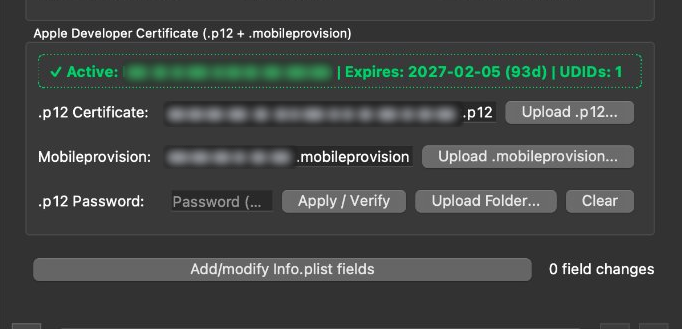
Drop your Apple Developer .p12 and .mobileprovision straight into Sideloadly Advanced Options. Zero Apple ID prompts, 365-day validity.
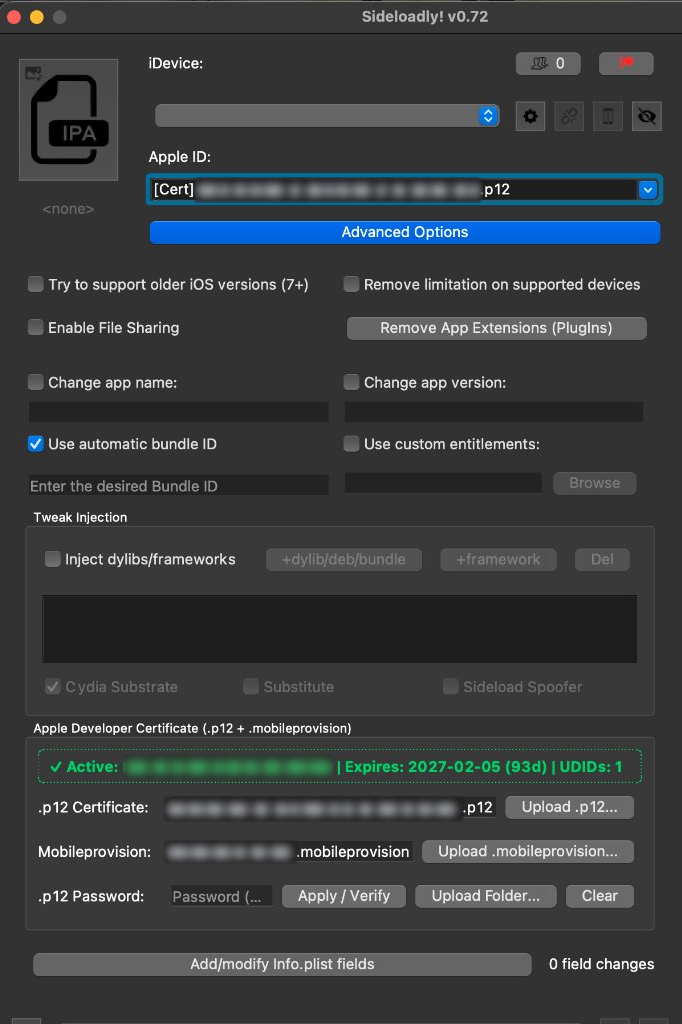
Click a sample developer certificate preset on the left (or drag any .p12 and .mobileprovision file onto the dark Qt5 panel) to see how Sideloadly-Cert validates your identity.
Select a preset to populate the native Qt5 controls:
Sideloadly-Cert injects a native Objective-C++ Qt5 widget tree and hooks Python's signpipe in memory so USB and Wi-Fi installations work identically to stock Sideloadly.
Drop your .p12 and .mobileprovision individually, together, or as a folder. The panel expands and collapses in lockstep with Advanced Options so the Start button is never clipped.
Your .p12 private key is imported into a disposable ephemeral keychain during signing or read from PASSWORD.txt automatically, keeping your login keychain clean.
Decodes your provisioning profile via security cms -D -i, aligns application-identifier and keychain-access-groups, and embeds embedded.mobileprovision.
Intercepts GuiImpactor.sign_return_Error after tweak injection and signs every nested binary from deepest dependency to top-level bundle before handing the IPA to Sideloadly's device installer.
Keep every Sideloadly tweak-injection and plist-editing workflow while removing free-account limitations.